My Home Assistant setup is, to put it generously, a work in progress. To put it accurately, it’s a sprawling collection of good intentions, questionable decisions, and at least three things that really ought to be working but aren’t. Over the past few weeks, I have subjected it to a series of changes, fixes, and what I will loosely call “improvements”. Here, for your entertainment, is a full accounting of the chaos.
If you want the TL;DR version, here it is:
Overall verdict: impressively functional for something with 292 unavailable sensors, 27 dead entities, an SD card that already died once, and a vacuum automation that has never existed. A solid foundation beneath a frankly memorable amount of accumulated technical debt.
Home Assistant Audit — Confidential Technical Review
The Stream Deck That Eventually Worked
Every smart home enthusiast eventually reaches the point where simply telling the lights what to do is not enough — they need a dedicated button for it.
I am no different. I set up an Elgato Stream Deck button to trigger adaptive lighting in my office, which in theory meant one tap and the lights would adjust themselves intelligently to the time of day. In practice, it meant staring at the Home Assistant documentation for far longer than I care to admit before finding the exact entity ID that would actually respond. It still does not respond when I ask it to set adaptive lighting, and the 10pm blistering blaze of light is still burning a hole in my retina. I choose not to dwell on what it cost me in dignity to get there.
The Great Tapo 403 Fiasco
My TP-Link Tapo smart plugs, which had been behaving themselves perfectly well, suddenly stopped communicating with Home Assistant entirely.
The error logs were cheerfully reporting over a hundred thousand failed handshake attempts, which is the sort of number that makes you wonder whether you have built a smart home or simply a very complicated way to produce error messages. The culprit turned out to be a setting buried in the Tapo app called Third Party Compatibility — charmingly, a firmware update had silently disabled it. Toggling it off and back on again fixed everything instantly. Still, it is working now, and I have added “check Third Party Compatibility” to the troubleshooting flowchart that lives permanently in the back of my head.
The Vacuum That Would Not Vacuum
My Dreame D9 Max robotic vacuum — which the children nicknamed Ruby, but won’t let me clip the Kaiser Chiefs — developed a persistent refusal to clean the dining hall on command. The script that sent it to the living room worked perfectly.
The one for the dining hall threw an error every single time: 'bool' object has no attribute 'start'. This is exactly the sort of error message that sounds as though it should be helpful and is, in practice, completely baffling. It turned out that the YAML configuration was corrupted, and once the segments were reset the hoover went about its business without further complaint. I briefly considered thanking it.
I do not, though, have access to when Dreame thinks I should replace the filters and brush bars. I may pre-empt things and replace them at 25%, because things are starting to feel dirty again.
So Where Does That Leave Us?
My Home Assistant setup is, after all of the above, marginally more functional than it was a month ago. The lights do what the button tells them. The plugs are talking to Home Assistant again. The heating is no longer running up bills in the background. The vacuum cleans the rooms it is told to clean. So, one Tuesday morning in the Easter holidays, I got bored, gave Claude access to my Home Assistant, and asked it to roast me.
I do use Claude for a few things, and some of Home Assistant’s most fiddly “screw you” type issues have been handled with its help. So it already has MCP access, and I expect it has far more unfettered access than I realise. I know there are integrations I have never used, broken things I have never fixed, and I am about to get a long list of to-dos in the custom Vikunja integration I have set up as my ongoing clipboard of fun.
Now I Write Horrendous Prompts, So I Asked Perplexity
Oh my God. If I had applied for a job as a prompt engineer in the early days of the AI boom, I would have been sacked very quickly. I use Claude Code on a few projects that I would never be able to code myself, and I think that it thinks I am hallucinating. So I asked Perplexity to come up with a prompt that would add items to my Vikunja to-do list while giving me a hard time all the way through.
The problem was that when I fed Perplexity’s prompt into Claude, it surfaced even more issues than I was expecting — many of them, thankfully, ones I already knew about and could fix:
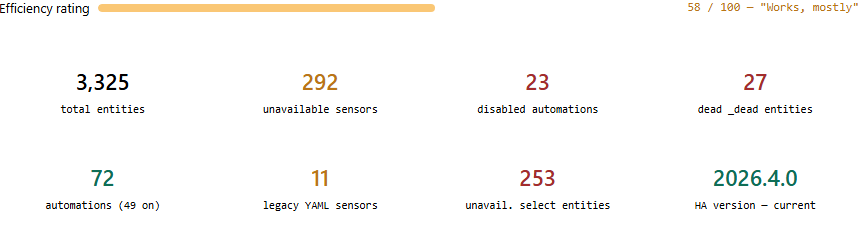
Or, as Perplexity reviewed the Claude report:
After a full technical audit, the verdict came back clear: this Home Assistant setup is both magnificently capable and mildly absurd. It has thousands of entities, complex automations, multiple tablets running kiosk dashboards, and an AI-powered chore-tracking system that appears to work better than some startups. And yet — 292 sensors are unavailable, a quarter of the automations are asleep, and the one task that has never been automated is vacuuming.
It is, in short, a cathedral of good intentions built on a slightly wobbly SD card.
Duplications, Parallels and Redundants
Much of the Claude report was actually about what was not working, because something else was. When I swapped out an old — and I mean 2016 old — tablet for a new cheap 12-inch SGIN Tablet from Amazon, I asked Claude to do the legwork. It duplicated the old automations and conditions that depended on the previous tablet and mirrored them to the new one. It also appended the word NEW to all the new elements, and we never bothered to remove it.
“NEW” has become “the current one.” There is something philosophically interesting here. Mostly there is naming chaos.
It also meant some tangential automations got duplicated as well, like an alert for when the dehumidifier is full and a message that appears on the new tablet screen.
The review also found that 31% of the automations are currently disabled. That is not much of a surprise, since I have recently been moving our KidsChores integration to the new ChoreOps integration — mainly because the former is being deprecated and the latter is its spiritual 2.0. As Claude put it: “Disabling rather than deleting is the smart home equivalent of putting things ‘somewhere safe.’ They are, presumably, very safe.”
Also Some Projects to Nowhere
One of the early projects I tried to automate was replacing the need to open our phones and check when the next bus was expected. We know which times of day we usually need a bus, when taking one or the other children to their extra-curricular activities, so the idea was to have one specific screen automatically display the bus arrival estimates beforehand.
That turned out to be more complicated than it sounds. UK bus operators feed their live data into a government-run open data repository, but a lot of private companies and enthusiasts have spent a long time turning that into the information you see in the First Bus mobile app or on BusTimes. That is far more time than I have, so I mothballed the whole thing — except for the Home Assistant bits:
3,325 total entities sounds impressive. Approximately 400 of them are asking when your bus timetable project started.
On the Plus Side: I Have a Prioritised List
Critical:
- Move from an SD card to an SSD drive.
Get rid of the last bits of KidsChoresDone.Migrate some legacy templates that are being deprecatedDone.
High:
Remove dead entities — from when I moved from my IKEA Dirigera Hub to Matter-over-Dirigera (or was it the other way around?)Done.- Rebuild the automations for my Dreame D9 RoboHoover.
- Remove the redundant bus timetable bits.
- Remove bits from a Christmas Day-based digital treasure hunt — it vaguely worked, but not well enough to blog about.
Medium:
- Fix types on the names of some of my smart plugs.
- Investigate and fix browser_mod.
As you can see, I am getting through them!
However, Claude does not make it sound that bad:
What emerges from this audit is the portrait of an enthusiast in a permanent state of mid-project: always building, occasionally completing, rarely deleting. The infrastructure is more capable than most households will ever require. The task tracker knows about every outstanding item in extraordinary detail, some of which have been outstanding since the summer. The vacuum robot is docked. The SD card is silent but not immortal. The legacy YAML sensors are running out of time in a rather literal sense.
The ChoreOps migration is the right priority. Finish it, clean up behind it, and then — if the SD card cooperates — consider buying that SSD before it contributes to the next incident report.
Still, the Nest Protect is working, the lights adapt to the sun, the children are being successfully gamified, and everything technically runs. Mostly.